
Download Automation & Queue
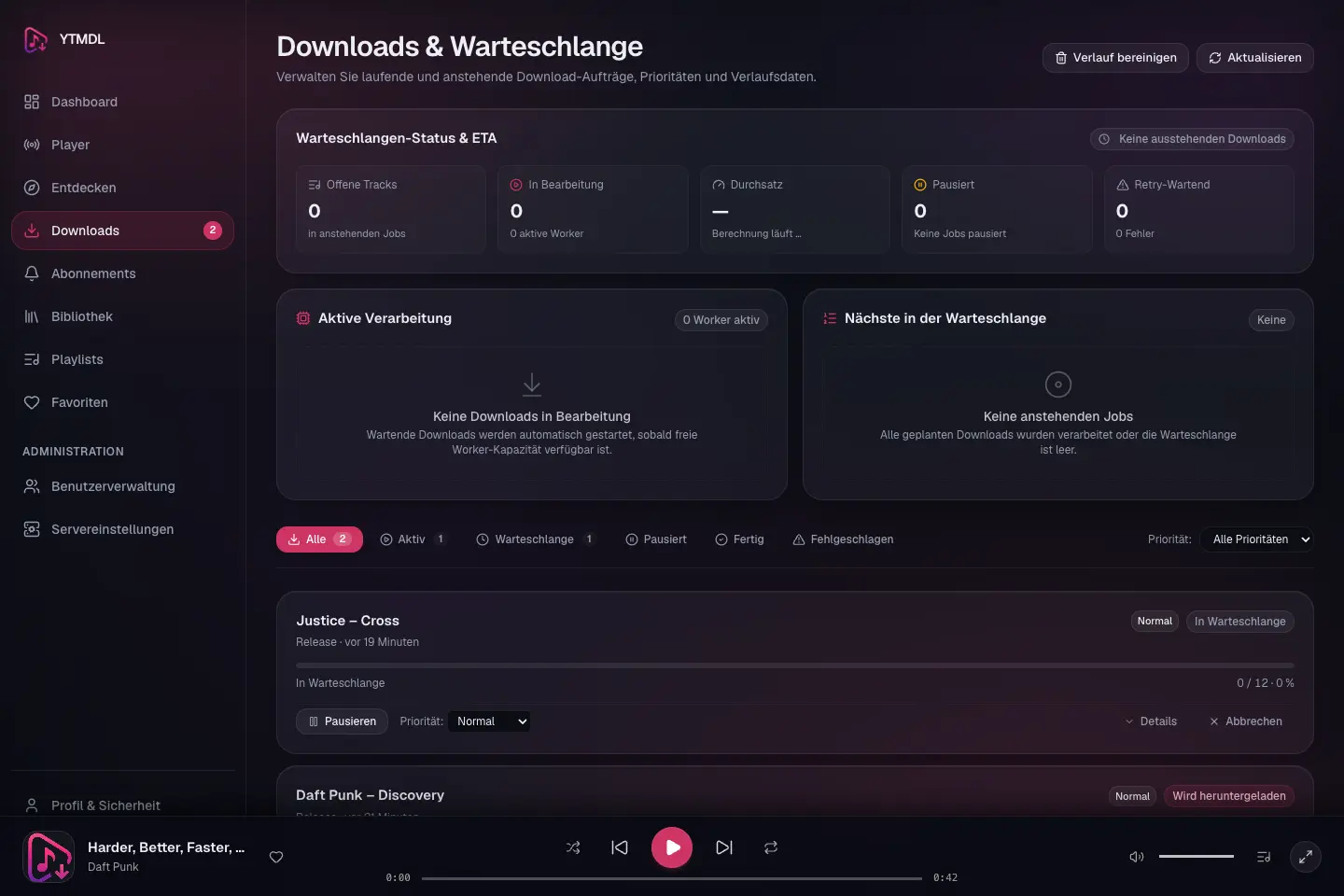
The YTMDL download engine coordinates background worker pools to process individual tracks, complete albums, and full discographies without starving shorter jobs.
Fair Queue Scheduling
- Fair Division: Jobs with hundreds of tracks are processed in balanced round-robin chunks, ensuring a single massive discography cannot monopolize the queue.
- Opus Stream Extraction:
yt-dlpextracts native Opus streams (audio/opusinside WebM containers) and remuxes them stream-copy into.opus(Ogg) containers without generational audio transcoding. - Verification: Every downloaded file is probed via
ffprobeto verify audio stream validity, channels, and sample rates before promotion to the library. - Retry & Circuit Breaker: Transient network or rate-limiting errors trigger exponential backoff.
Job Priorities
Every job carries a priority that decides its order relative to other jobs. Manual requests are placed ahead of background automation by default.
| Priority | Label (UI) | Assigned to |
|---|---|---|
low | Niedrig | Artist subscription synchronization and background discovery jobs |
normal | Normal | General default |
high | Hoch | Manually requested downloads (artist, release, or track) |
very_high | Sehr hoch | Reserved for expedited items |
- Change a priority: open a job on the Downloads page and pick a new value from the Priorität selector, or
PATCH /api/v1/jobs/{id}with{"priority": "..."}. - Raising a subscription job to
highlets it compete with manual downloads; lowering a manual job tolowparks it behind everything else.
Pausing the Queue
Global pause (storage maintenance)
Administrators can stop all queue processing from Settings → Storage (Warteschlange anhalten / fortsetzen), or via POST /api/v1/storage/queue/pause and .../resume. While paused the panel shows Download-Warteschlange: Pausiert. In-flight items finish their current step and no new work starts. YTMDL also pauses the queue on its own when the Storage Identity Guard fails or the library runs low on space.
Per-job pause
Individual jobs can be paused and resumed without affecting the rest of the queue (POST /api/v1/jobs/{id}/pause and .../resume). Paused jobs are listed under the Pausiert tab on the Downloads page. A paused job keeps its place and priority; deduplication still treats its items as pending so a subscription run will not create a duplicate job for the same release.
Understanding Status Labels
Job and item badges use plain-language German labels. The most common ones:
| Internal status | Job label | Meaning |
|---|---|---|
queued | In Warteschlange | Accepted, waiting for a worker |
resolving_artist / resolving_releases / resolving_tracks | Künstler/Releases/Tracks werden aufgelöst | Building the track list from metadata providers |
matching | Quellen werden gesucht | Selecting an audio candidate for each track |
downloading | Wird heruntergeladen | yt-dlp is fetching audio |
tagging | Tags werden geschrieben | Writing Vorbis comments and cover art |
finalizing | Wird finalisiert | Atomic promote from staging into /music |
retry_wait | Wartet auf Wiederholung | Transient error; will retry after backoff |
retry_wait + SESSION_UNAVAILABLE | Wartet auf Provider | Deferred by a temporary provider or session cooldown — not a failure and no retry budget is spent |
waiting_for_storage | Wartet auf Speicher | Library mount is offline; staged audio is safe |
waiting_for_space | Wartet auf Speicherplatz | Free space below the configured reserve |
completed | Abgeschlossen | Finished — individual track failures do not fail the whole job |
failed | Fehlgeschlagen | The job itself could not proceed |
cancelled | Abgebrochen | Cancelled by a user — never retried |
A track that does not finish within YTDM_TRACK_TIMEOUT goes to Wartet auf Wiederholung with the error code TRACK_TIMEOUT and is retried like any other transient error, within the item's attempt limit (MUSICDL_MAX_ATTEMPTS); on its last attempt it fails. The time limit is local: it never pauses a provider or marks a media session. Only an explicit cancellation ends a track as Abgebrochen. Stopping or restarting the service is neither: interrupted tracks are picked up again after the restart.
NOTE
A job that finishes with some failed tracks remains completed, and appears in Fertig, with the badge Abgeschlossen mit Problemen. Click the amber track count to inspect only its failed tracks. Opening these details never starts a retry. Use Fehlgeschlagene wiederholen or a single item's retry action to explicitly re-attempt those tracks.
The Downloads page tab badges (Aktiv, In Warteschlange, Pausiert, Abgeschlossen, Fehlgeschlagen) reflect global database totals, not just the jobs visible on the current page.
The selected status group and priority are applied on the server before pagination, so older failures remain discoverable. Paused is an overlay on non-terminal jobs; it overlaps the active and queued groups. Direct links to a job load that job independently of its position in the list.
Understanding Errors
Search errors and download problems explain the known cause and a next step in German. Unknown causes remain unknown: a provider connectivity failure does not imply expired cookies. Raw provider output is not shown in these notices. Technische Details reveals the error code and, for API failures when available, the request ID for support.
Automatic continuation is shown for a download scheduled for retry, with its continuation time when available. Failed search requests do not promise an automatic repeat. Provider/session cooldown notices offer no immediate retry button; new cookies do not lift an active protective pause.
Ursachen bei nicht verfügbaren Aufnahmen
Die Downloadansicht unterscheidet MEDIA_AGE_RESTRICTED (fehlende Altersfreigabe), MEDIA_PREMIUM_REQUIRED (Premium-Anforderung) und MEDIA_UNAVAILABLE (Aufnahme zum Prüfzeitpunkt nicht verfügbar). Diese Fehler betreffen einzelne Quellen. Sie lösen keine Provider-Pause aus und werden nicht unverändert automatisch wiederholt. Ein manueller Versuch bleibt möglich, wenn sich der Zugang oder die Verfügbarkeit geändert hat.
Nur wenn die fehlgeschlagenen Kandidaten dieselbe Ursache melden, übernimmt der Auftrag diesen spezifischen Fehlercode. Gemischte oder unbekannte Ursachen bleiben TRACK_NOT_FOUND; Format- und Schutzfehler behalten ihre bisherige Priorität. Die Oberfläche interpretiert keine rohen Provider-Meldungen.
Optional kann eine geprüfte Veröffentlichung als options.release_announcement mit date (YYYY-MM-DD), source und checked_at (ISO-Zeitstempel) hinterlegt werden. Der Hinweis erscheint bei noch vorhandenen Fehlern mit Quelle und Prüfdatum. Ein angekündigter Termin beweist nicht, dass alle Aufnahmen erst dann verfügbar werden. Nach dem Termin fordert die Ansicht eine erneute Prüfung an; allein der Hinweis plant keinen Neustart. Es ist keine Datenbankmigration nötig.