
Integrated Web Player
YTMDL features a persistent, in-browser HTML5 audio player designed for seamless music listening directly from your library without external desktop applications.
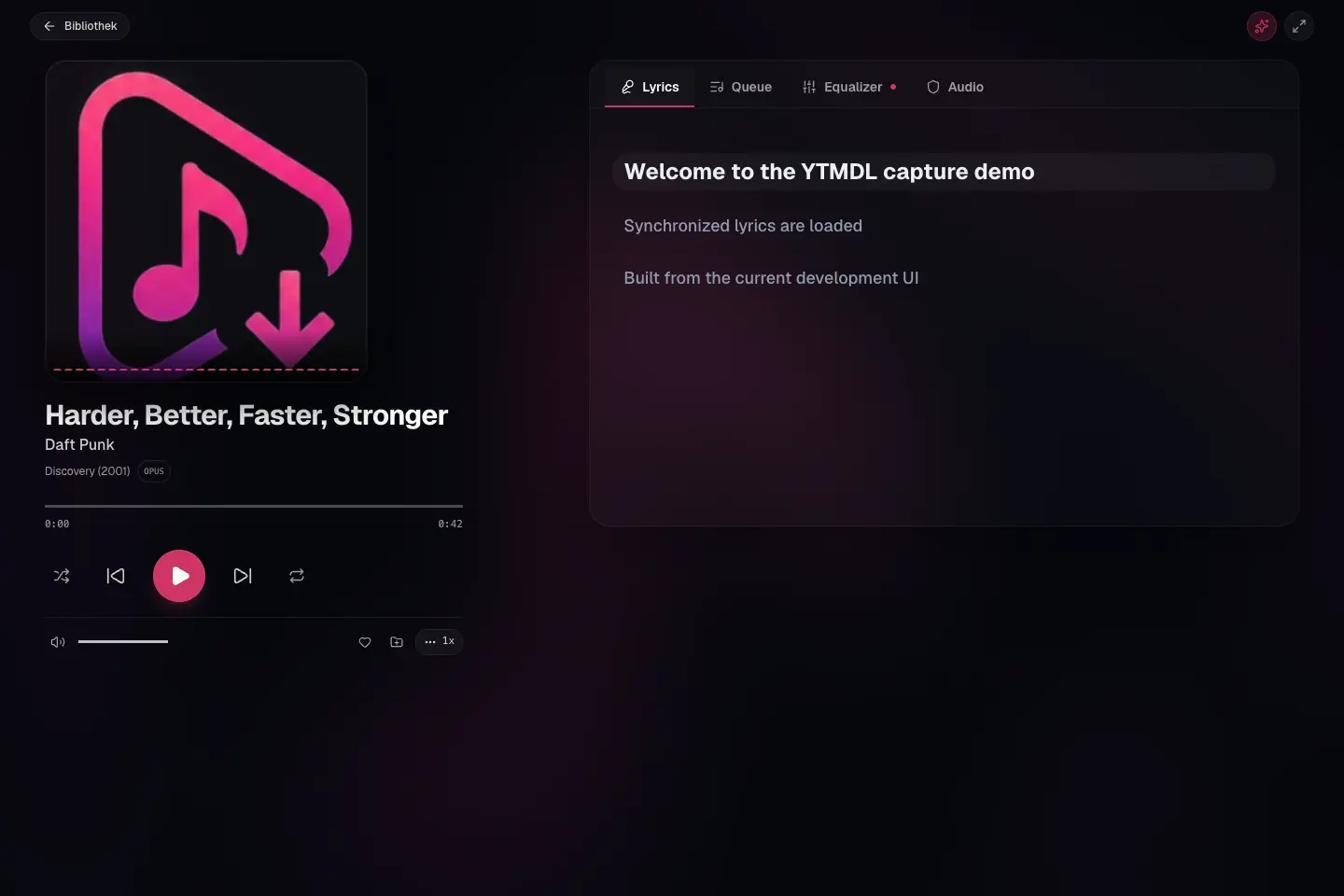
Playback & Streaming Architecture
- Persistent Playback: The player context remains persistent throughout in-app navigation and browser history traversal (Back/Forward). State updates are isolated so audio progress ticks do not trigger re-renders of the application view.
- HTTP Range Streaming: The backend audio streaming endpoint natively supports HTTP 206 Partial Content and byte-range requests (
Accept-Ranges: bytes), enabling instant seeking across large audio files without waiting for the full file to buffer. - Native Audio Delivery: Stored audio files are streamed directly in their native storage container and encoding format. No automatic server-side audio transcoding is performed or introduced in v0.22.0. Playback compatibility depends on browser-native container and codec support (such as Opus in Ogg/WebM, AAC in M4A/MP4, MP3, and FLAC).
- Media Session Integration: Integrates with the browser Media Session API for native operating system controls, lock screen metadata, and hardware media keys.
Playback Queue Management
Starting with v0.25, the web player provides a first-class interactive playback queue drawer and control surface.
IMPORTANT
Playback Queue vs. Playlists vs. Download Queue:
- Playback Queue: A listening queue saved in this browser for the signed-in user. Reloading restores it paused; it does not sync between devices.
- Playlists: Permanent, database-backed user collections created in the Playlists section.
- Download Queue: Asynchronous background job queue managing download and metadata acquisition tasks.
Queue Features & Operations
- Queue Drawer Panel: Click the queue icon in the MiniPlayer or open the Queue tab in Now Playing (
/player?tab=queue) to inspect the current queue. - Direct Track Selection: Clicking any item in the queue immediately begins playback of that track while maintaining proper queue progression.
- Reordering: Tracks can be rearranged using HTML5 drag-and-drop or via accessible Move Up and Move Down buttons on desktop, tablet, and mobile.
- "Als Nächstes abspielen" (Play Next): Inserts a track immediately after the currently playing item. If the track is already present in the queue, it is repositioned to play next without creating duplicates.
- "Zur Queue hinzufügen" (Add to Queue): Appends a track to the end of the temporary queue. Duplicate occurrences are fully supported and safely tracked.
- "Nächste leeren" (Clear Upcoming): Prunes upcoming tracks after the current item while preserving already-played tracks and the currently playing item. This ensures that navigation backwards ("Previous") remains fully functional.
- "Leeren" (Clear Queue): Empties the entire queue and stops playback cleanly.
Queue & Library Integration
- Library & Multi-Disc Playback: Plays tracks, albums, or disc releases directly from the library interface. Multi-disc albums respect canonical disc and track sequencing.
- Consistent Queue Actions: "Als Nächstes abspielen" and "Zur Queue hinzufügen" actions are available across Library tables, Search results, Album pages, Playlists, and Favorites.
- Shuffle & Repeat: Supports shuffle mode and three-way repeat cycling (off, repeat all, repeat single track). Queue mutations while shuffled maintain deterministic mapping to original queue ordering.
- Responsive Controls: Desktop control bar with timeline scrubbing, volume slider, and album artwork, transitioning to a compact responsive mini-player on mobile and tablet viewport widths.
Full player, lyrics and transitions
The full player fits desktop windows by reducing the artwork height and scrolling the right panel independently. Smaller and short landscape windows use normal page scrolling so every control remains reachable. Synchronized lyrics scroll only their panel. Scrolling lyrics manually turns following off; use Lyrics folgen to resume. Following respects the browser's reduced-motion setting.
Under Audio, Überblendung zwischen Liedern sets a transition from 0 (off) to 12 seconds in one-second steps. The setting is saved in this browser. Album-Reihenfolge erhalten suppresses the overlap for consecutive tracks of the same album. Repeat-one, stop-after and end-of-track/album sleep timers keep their boundaries. Short tracks or an unready next stream finish normally.
During an overlap the next track becomes current exactly once, after its audio starts. Pause stops both decks; seeking or manually selecting another track ends the overlap. If the next deck cannot start, the current track continues and the normal completion path handles the next selection. Background tabs and Safari/iOS remain subject to browser playback and timer policies; acoustic seamlessness is not guaranteed.
Keyboard Shortcuts
Global player shortcuts are available during active browsing and automatically isolated whenever focus is within an input field, search bar, or modal dialog:
| Shortcut | Action |
|---|---|
Space | Play / Pause toggle |
ArrowLeft / ArrowRight | Seek backward / forward 5 seconds |
ArrowUp / ArrowDown | Adjust volume up / down |
M | Mute / Unmute toggle |
Shift + ArrowRight | Next track |
Shift + ArrowLeft | Previous track |
S | Toggle shuffle |
R | Cycle repeat mode |
Mobile Controls
On narrow viewports the player collapses to a compact MiniPlayer. From v0.27.0 the mobile MiniPlayer is tuned for 390 px and 320 px widths: the cover and track text open the full Now Playing view, secondary controls (favorite, previous, a separate expand button) are hidden to give the track title room to ellipsize, and a 24 px seek strip stays along the top edge. Play/pause and next remain directly on the bar.
Known Browser Limitations
The player is a standard HTML5 <audio> element plus the Web Audio API (AudioContext) for the equalizer, crossfade, and visualizer. What actually plays therefore depends on the browser, not on YTMDL:
- Container/codec support is the browser's. Opus-in-Ogg plays in Chromium and Firefox; Safari's support for Ogg/Opus has historically been partial and version-dependent. AAC/M4A, MP3, and FLAC are widely supported. YTMDL streams the stored file as-is (HTTP range requests) and never transcodes on the fly, so an unsupported codec fails in that browser only.
- iOS / Safari: audio must be started by a user gesture, and Web Audio routing of a media element has known quirks on iOS. Basic playback works; EQ, crossfade, and the visualizer may behave differently or be unavailable.
Safari/iOS behaviour and acoustic gapless playback/crossfade have not been conclusively verified for this release; Chromium/Firefox desktop results are the verified baseline.
- No offline / PWA mode. YTMDL is not an installable Progressive Web App and ships no service worker. There is no native desktop, mobile, or TV (tvOS / Android TV) application — the web UI in a browser is the only client.
- Automated tests cover the player logic (state machine, queue, formatting) in a headless DOM. Cross-browser playback of specific codecs is not part of the automated suite and should be verified in the browsers you actually use.