
The audit log
Every change and every refusal leaves an entry. The log is append-only and hash-chained, so an edit, a deleted entry or a cut-off end is detected when you verify it. This guide shows how to read the log, how to check it, and what to keep outside the server.
- When to use this
- What is logged
- The hash chain and the checkpoints
- 1. Verify from the command line
- 2. Read the log
- 3. Export
- 4. A refused action
- Retention
- Check it worked
- When it fails
- Next steps
When to use this
- You want to know who issued, revoked or changed something, and from which address.
- You suspect that someone changed the files on the server.
- You must show that the log is the one you had (an audit, an incident).
- A user reports “it was refused” and you want to see why.
What is logged
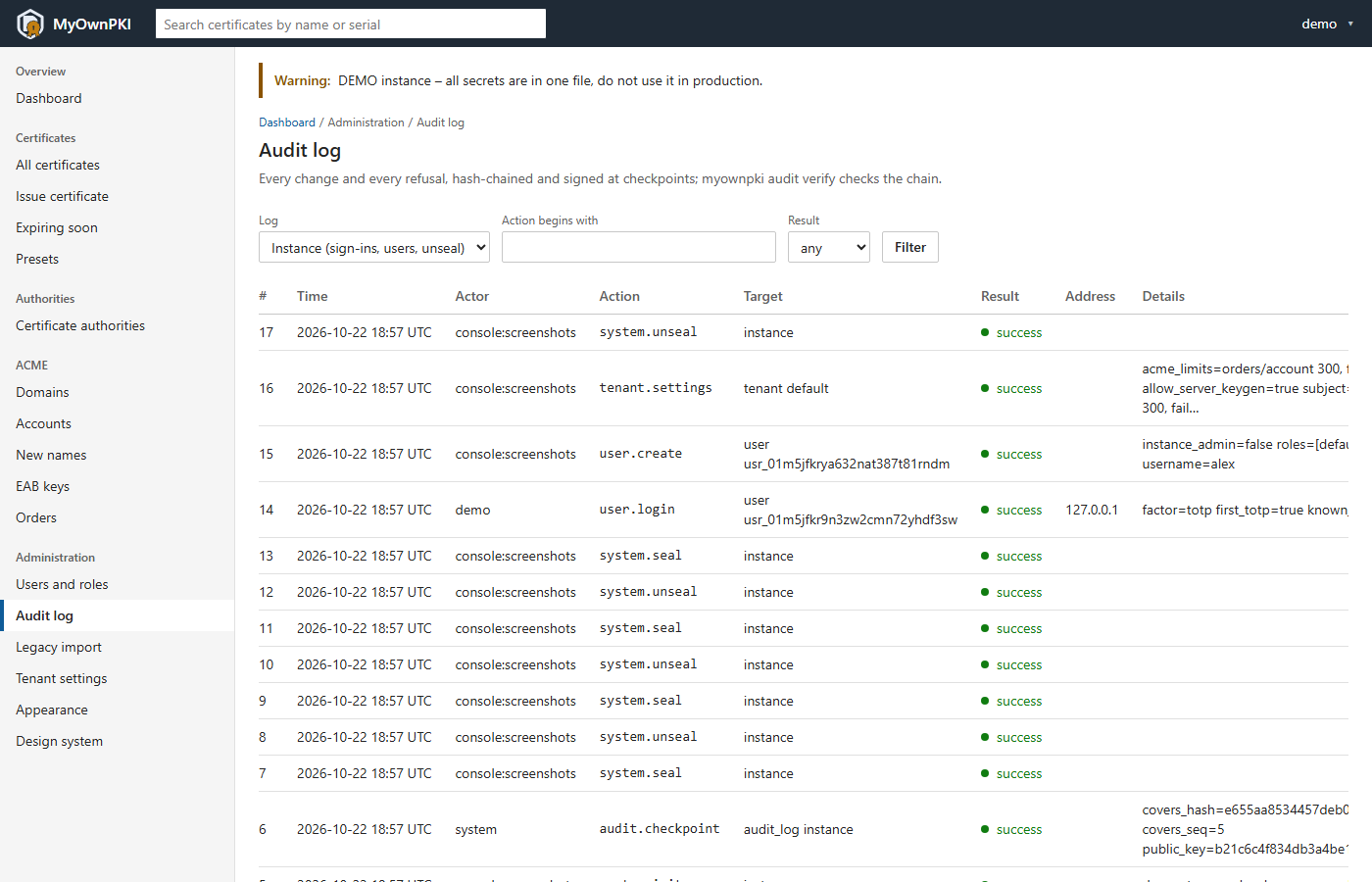
There are two logs. The instance log (audit.db) holds sign-ins, user management, unseal and
seal, backups and restores, and the tenant settings (tenant.settings, because they live in
system.db). The tenant log (tenants/<tenant>/audit.db) holds everything about the PKI: CAs,
certificates, revocations, CRLs, the legacy import, ACME and agents.
Each entry records who (a user, an API token, the system, an ACME account or an agent), what, when, from which address, the target and the result. It does not record a user agent or free text from a request, and the details never contain secrets: keys that look like passwords or tokens are refused. Examples of actions:
| Action | When |
|---|---|
user.login, user.step_up, user.create, user.role_set |
Sign-ins, second-factor confirmations, user changes |
system.unseal, system.seal, system.backup, system.restore |
Key ring and backups |
certificate.issue, certificate.revoke |
Certificates |
ca.create, ca.import_root, ca.csr_create, ca.certificate_install, ca.renew, ca.retire |
CA lifecycle |
crl.upload, import.legacy |
CRL upload, the legacy import |
tenant.settings |
A change of the tenant settings (in the instance log) |
audit.checkpoint |
A signed checkpoint of the log itself |
A command at the server’s console is logged too, with an actor such as console:root.
The hash chain and the checkpoints
Each entry carries a SHA-256 over its own content and the hash of the entry before it. Changing one entry breaks every hash after it. The database also refuses updates and deletes by trigger, but the chain is what catches someone editing the file directly.
A chain alone cannot show that its end was cut off or that someone with write access recomputed all of it. So the server also keeps:
- signed checkpoints: an Ed25519 signature over the entry before, made at unseal, before seal, daily
and every 1000 entries. The key is derived from the root key. Its fingerprint is shown at
initand logged at unseal. Write it down. - chain heads (
seq:hash) in the server log at start and once a day, and in every backup manifest.
A checkpoint needs an unsealed server, so a long-sealed server has none that are recent.
1. Verify from the command line
runuser -u myownpki -- /usr/local/bin/myownpki audit verify --config /etc/myownpki/config.yaml --checkpoint-key <fingerprint>
It walks every chain and the checkpoints and writes nothing. Each log gets a line, for example
OK – 17 entries, head 17:…. Exit code 0 means intact, 1 means broken or unreadable, 3 means a log
does not exist yet. With the fingerprint it also proves that the log was not re-signed with another
key. Without it, audit verify still works but cannot prove that the log is the one you had.
To check one log against a head you noted earlier (from the server log or a backup manifest):
runuser -u myownpki -- /usr/local/bin/myownpki audit verify --scope instance --expect-head <seq>:<hash> --config /etc/myownpki/config.yaml
--scope is instance or tenant:default, and --expect-head needs it. Where to find a head:
journalctl -u myownpki -o cat | grep 'audit chain head'
Over the API, an admin can call POST /api/v1/audit/verify with scope and checkpoint_key.
2. Read the log
In the UI open Administration → Audit log. The filters are Log (the tenant log, and for instance admins the instance log), Action begins with and Result. The page shows 50 entries, newest first, and Older entries continues. The tenant log is for admins; viewers and operators cannot read it, because user names and addresses are personal data. The instance log is for instance admins.
3. Export
There is no export button and no export command in this release. Read entries through the API instead; the answer is JSON, newest first, with a cursor:
curl -sS --cacert root.pem -H "Authorization: Bearer $MYOWNPKI_TOKEN" "https://pki.homelab.lan:9443/api/v1/audit?limit=100&since=2026-11-01T00:00:00Z"
Parameters: scope (tenant or instance), action (a prefix such as certificate.), result,
since, until, limit (1 to 100) and before (the next_before of the previous page). Every entry
includes its hash and prev_hash. Export to a SIEM or syslog is planned; it does not exist yet.
Until then, copy exports and backups to a place the server cannot write to, which is what makes a
copy a useful anchor.
4. A refused action
A refusal is an entry like any other, with the result denied or failure:
denied: the policy refused the request (for example it broke a name constraint). The details list the reasons.failure: the action was allowed but could not run (the server was sealed, or something broke inside).- A wrong sign-in is
user.loginwithfailure. Every unseal attempt is logged, wrong ones included.
The UI shows denied in red and failure in yellow. Filter with Result to see only them.
Retention
Entries cannot be edited or deleted one by one; that is what keeps the chain trustworthy. There is no automatic expiry and no command to archive a log in this release. The design intends erasure requests to be handled for a whole log (archive it, start a new chain after the retention period) and says this must be assessed by your data protection officer. Entries hold user names and source addresses, so document the period and the legal basis in your own records. This is not legal advice.
Check it worked
audit verifyprintsOKfor both logs and exits 0.- The printed checkpoint key equals the fingerprint you wrote down at
init. - A test action, for example creating a user, shows up in the page (choose the instance log) with your name and address.
When it fails
BROKEN at seq N – …: the log was changed outside MyOwnPKI. Keep the file for investigation and compare with a backup (backup verify). If someone may have been on the server, follow operations guide §8.not created yet: the log file does not exist; runmyownpki db migrate.--expect-head needs --scope: a head belongs to one log; add--scope.- The page is missing from the menu: you have no tenant-wide admin role (a viewer or operator never
sees it). An instance admin without that role can still open the instance log at
/admin/audit?scope=instance. - More: Troubleshooting.
Next steps
- Restore the log with everything else, and see its head in the manifest: Backup and restore.
- Decide who may read it: Users, roles, second factor.
- The design in the operations guide: §4.