
CA lifecycle: create, renew, replace
A CA is a key with a certificate. This guide covers the tasks around it: creating a root and an intermediate, renewing an intermediate before it ends, replacing one, and what you must tell clients.
- When to use this
- Rules that never change
- 1. Create a root and an intermediate
- 2. Issue the first certificate
- 3. Renew an intermediate
- 4. Replace an intermediate
- What is not supported
- What clients must do after a replacement
- Check it worked
- When it fails
- Next steps
When to use this
- You set up the PKI by hand instead of with
init --with-ca. - The
ca_expiryalert fired (a CA ends in 90 days, critical at 30). - An intermediate needs a new key, a different purpose or different name constraints.
Rules that never change
- A CA has generations. Each key with its certificate is one generation, and a certificate’s CRL and
issuer addresses contain the generation (
<base>/ca/<name>/<n>.crt,<base>/crl/<name>/<n>.crl). - A CA’s name and its public base URL are fixed for good. Choose a stable DNS name you control.
- A root signs intermediates and CRLs only. The engine refuses to issue end-entity certificates with it.
- Creating, renewing, retiring or revoking a CA needs the tenant role admin (tenant-wide to create) and a fresh second factor. An API token can never do it.
- CAs are created in the UI or through the API. The command
myownpki caonly lists and shows.
1. Create a root and an intermediate
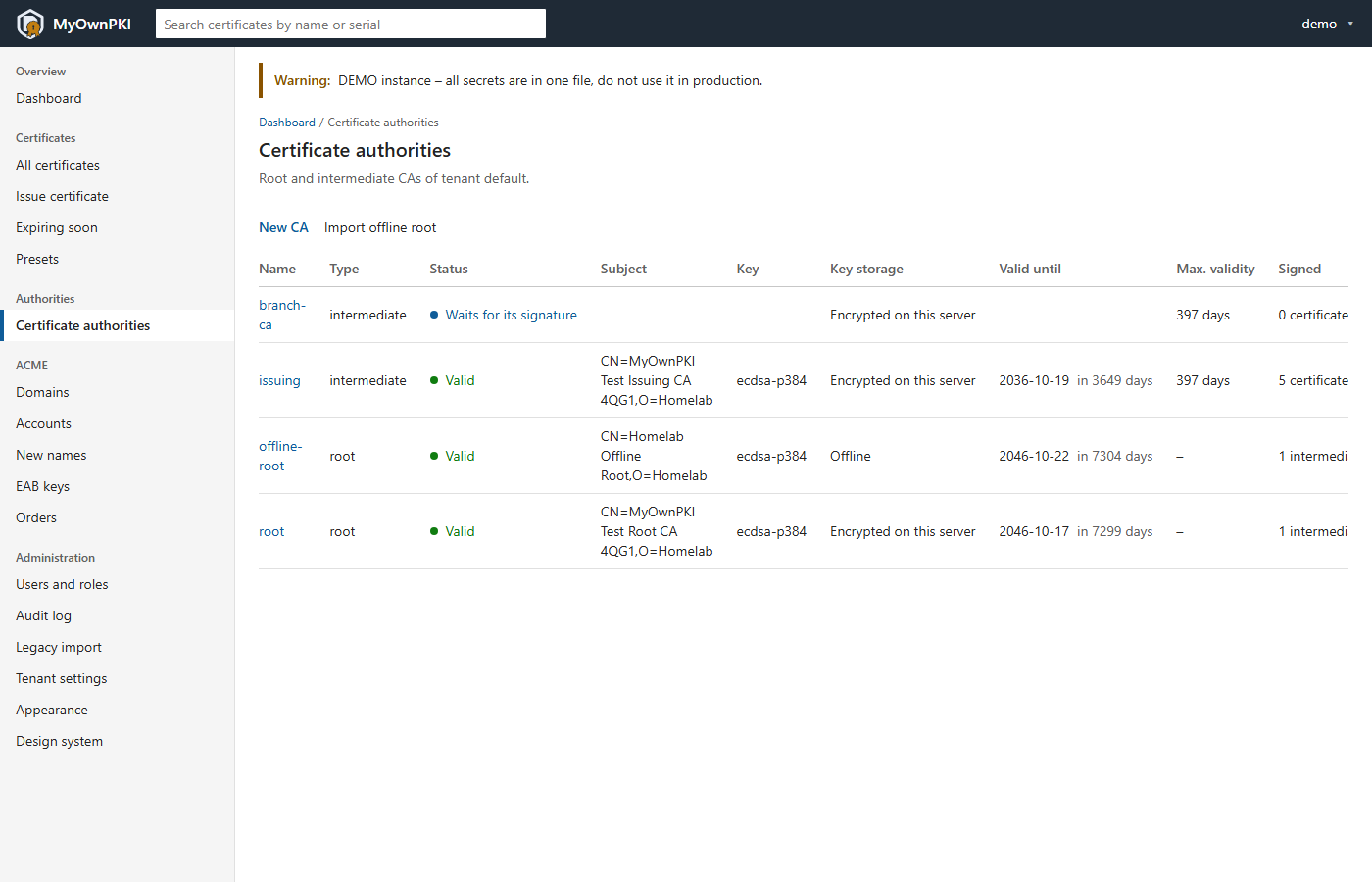
Recommended: an offline root, then an online intermediate (Sign with an offline root). For tests and homelabs that accept an online root, the UI creates one directly.
- Certificate authorities → New CA, parent none creates an online root. Give the name, common name, algorithm (P-384 is the default; P-256, RSA 3072 and RSA 4096 are offered), validity (empty means 7300 days) and the public base URL. The result carries a warning that an online root keeps its key on this server, which is fine for tests and a homelab, and that an offline root is best practice.
- New CA again, parent = the root. For an intermediate, set:
- path length,
0so that it can issue only end-entity certificates; - permitted DNS names and IP ranges (name constraints), recommended: even a stolen key then cannot sign names outside them;
- an EKU limit if it should serve only some uses, for example
serverAuth; - the maximum certificate validity (397 days if empty) and the CRL lifetime (7 days if empty). Validity is never beyond the parent’s; empty means 3650 days.
- path length,
- Below an online root the intermediate is signed at once. Below an offline root it waits for its signature.
The engine checks the parent: its path length must allow another level, the EKU limit must be a subset, and it warns about DNS name constraints outside the parent’s. Ed25519 is never accepted as a CA key.
2. Issue the first certificate
On the host that will use it, make a key and a request, then issue in the UI with the preset server:
openssl req -new -newkey ec -pkeyopt ec_paramgen_curve:P-256 -nodes -keyout www.homelab.lan.key -out www.homelab.lan.csr -subj "/CN=www.homelab.lan" -addext "subjectAltName=DNS:www.homelab.lan"
The wizard is described in Issue a first certificate in the web UI, revoking and renewing in Renew and revoke.
3. Renew an intermediate
Certificate authorities → the CA → Manage → Renew with a new key. Pick the algorithm and validity.
- The product renews only with a new key. The result is the next generation, which signs from now on.
- The old generation keeps its address and its CRL for what it already signed. Those certificates stay valid until they end.
- Below an online parent the new generation is signed at once. Below an offline root it waits for the offline signing flow, and you cannot start another renewal until you upload that certificate.
- Do it well before the old certificate ends: new certificates carry the new chain, and the ones already issued keep the old one.
4. Replace an intermediate
For a different purpose or name, create a new CA next to the old one (names cannot change). Point your ACME domains at it, then retire the old one: Manage → Retire. A retired CA signs nothing new, its certificates stay valid, its CRLs go on until everything it signed has ended, and retiring cannot be undone.
If the key may be compromised, revoke instead of only retiring:
- Below an online root: Manage → Revoke on the intermediate, with a reason. The root’s CRL lists it and everything below it stops working for clients that check revocation. A revocation is final. keyCompromise and cACompromise also block that key for every new certificate and CA.
- Below an offline root the UI refuses: revoke it at the root, then upload the root’s new CRL (When things go wrong).
What is not supported
- Renewing with the same key. Only a new key is accepted, for intermediates and for a re-imported root.
- Changing a CA’s name or base URL.
- Deleting a CA. You retire it.
- Undoing a retirement or a revocation.
- Revoking a root. Nobody can; remove it from the trust stores and retire it.
- Revoking an intermediate of an offline root from the UI. That happens at the root.
- Cross-signing or an automatic move of existing intermediates to a renewed root. The documentation describes neither.
- Ed25519 as a CA key. Imported RSA 2048 and P-521 keys are accepted with a warning only.
What clients must do after a replacement
| What changed | Clients |
|---|---|
| An intermediate was renewed or replaced, the root is the same | Nothing, if servers send the full chain. New certificates carry the new intermediate. Hosts with an old certificate keep working until it ends. Re-issue by hand what ACME clients and agents do not renew. |
| An intermediate was revoked | Clients that check revocation reject its certificates once they fetch the new CRL. Re-issue below a new CA. |
| A root was renewed (a new key) | Install the new root in every trust store before certificates below it are used, after comparing its fingerprint (Make clients trust your root). The trust page lists the older generation while it is valid. |
Check it worked
-
The new generation is listed and current:
runuser -u myownpki -- /usr/local/bin/myownpki ca list --config /etc/myownpki/config.yaml -
A certificate issued after the renewal verifies against your root:
openssl verify -CAfile root.pem -untrusted www.homelab.lan.fullchain.pem www.homelab.lan.fullchain.pem -
The audit log has
ca.create,ca.renew,ca.certificate_installorca.retire(The audit log).
When it fails
- The request is refused with reasons: a parent check failed (path length, EKU, validity). Fix what the message names.
- “already has a generation waiting for its signature”: upload that certificate first.
- “is an offline root – renew it offline”: import the new root certificate instead.
- The server is sealed: signing needs an unsealed server; unseal it.
- More: Troubleshooting and operations guide §4.
Next steps
- Keep the root’s CRL current: Sign with an offline root.
- Plan for failure: When things go wrong.
- Narrow CAs and short lifetimes: Best practices.