
Move from the old Bash suite
pki.sh, the Bash suite in legacy/, keeps working as the offline root tool. MyOwnPKI takes over
the intermediates, the issued certificates and the CRLs. Old certificates keep working: their CRL
addresses are served by the public listener, and the CRL numbers continue where pki.sh stopped.
- When to use this
- What the importer reads
- What is kept, and what is not
- 1. Look first: the dry run
- 2. Import
- 3. After the import
- Check it worked
- When it fails
- Next steps
When to use this
- You run a PKI made with
pki.shand want a web UI, ACME and monitoring on top of it, without re-issuing every certificate. - You have not issued certificates from MyOwnPKI under the same CA names yet. The importer refuses names and subjects that already exist.
What the importer reads
It reads the pki directory (the one with root/, intermediate/ and issued/). It only parses
files; nothing is executed.
| Read | Used for |
|---|---|
pki.conf |
AIA_BASE_URL (the public base URL), CRL_DAYS, the organization |
root/ and intermediate/<name>/: ca.meta, certs/ca.crt, private/ca.key, index.txt, newcerts/, crlnumber, crl/ca.crl, archive/ |
The CAs, every certificate each CA signed, revocations and the CRL numbering |
issued/<name>/: cert.meta, cert.pem, key.pem, archive/ |
The newest certificate of a name and its key. Older ones come from newcerts/. |
Files outside this list are not read.
What is kept, and what is not
| Kept identical | Not taken over, or changed |
|---|---|
| Serial numbers | The root’s key, unless you choose --root-key online. By default only its certificate is imported. |
| Revocations, with time and reason | certificateHold becomes a final revocation recorded as unspecified. A removeFromCRL entry counts as not revoked. |
| CRL numbers: the next CRL continues the numbering | An end-entity revocation with cACompromise is kept as keyCompromise. |
CA names and the <base>/<name>.crt and .crl addresses, if the base URL is the same |
A CA certificate that has no directory under intermediate/, and certificates not signed by a CA of the directory: not imported, with a warning |
| Private keys of intermediates and leaves, encrypted with the new root key | A certificate whose preset is unknown here: imported without a preset |
An expired CA is imported as retired. Self-signed certificates are imported as external. Problems refuse the whole import and write nothing; warnings do not.
1. Look first: the dry run
Copy the pki directory to the server over a secure channel. It holds CA and leaf keys, so treat the
copy like a backup and delete it when you are done. Then:
runuser -u myownpki -- /usr/local/bin/myownpki import legacy /srv/migrate/pki --dry-run --config /etc/myownpki/config.yaml
Nothing is written. The report lists every CA with its certificates, revocations and last CRL number,
the totals, and all problems and warnings. --base-url URL overrides AIA_BASE_URL; with the same URL
the old CRL addresses stay valid. A pki.conf without AIA_BASE_URL is a problem unless you pass
--base-url.
2. Import
If pki.sh encrypted its keys, give the passphrases as it expects them: PKI_CA_PASS_<NAME> for one
CA (or PKI_CA_PASS for all) and PKI_KEY_PASS for the leaf keys. The command asks for the unseal
passphrase to encrypt the keys into MyOwnPKI.
export PKI_CA_PASS_SERVER_CA='…'
sudo drops most of the environment, so keep the variables explicitly (list every one you set):
sudo --preserve-env=PKI_CA_PASS_SERVER_CA,PKI_KEY_PASS -u myownpki /usr/local/bin/myownpki import legacy /srv/migrate/pki --config /etc/myownpki/config.yaml
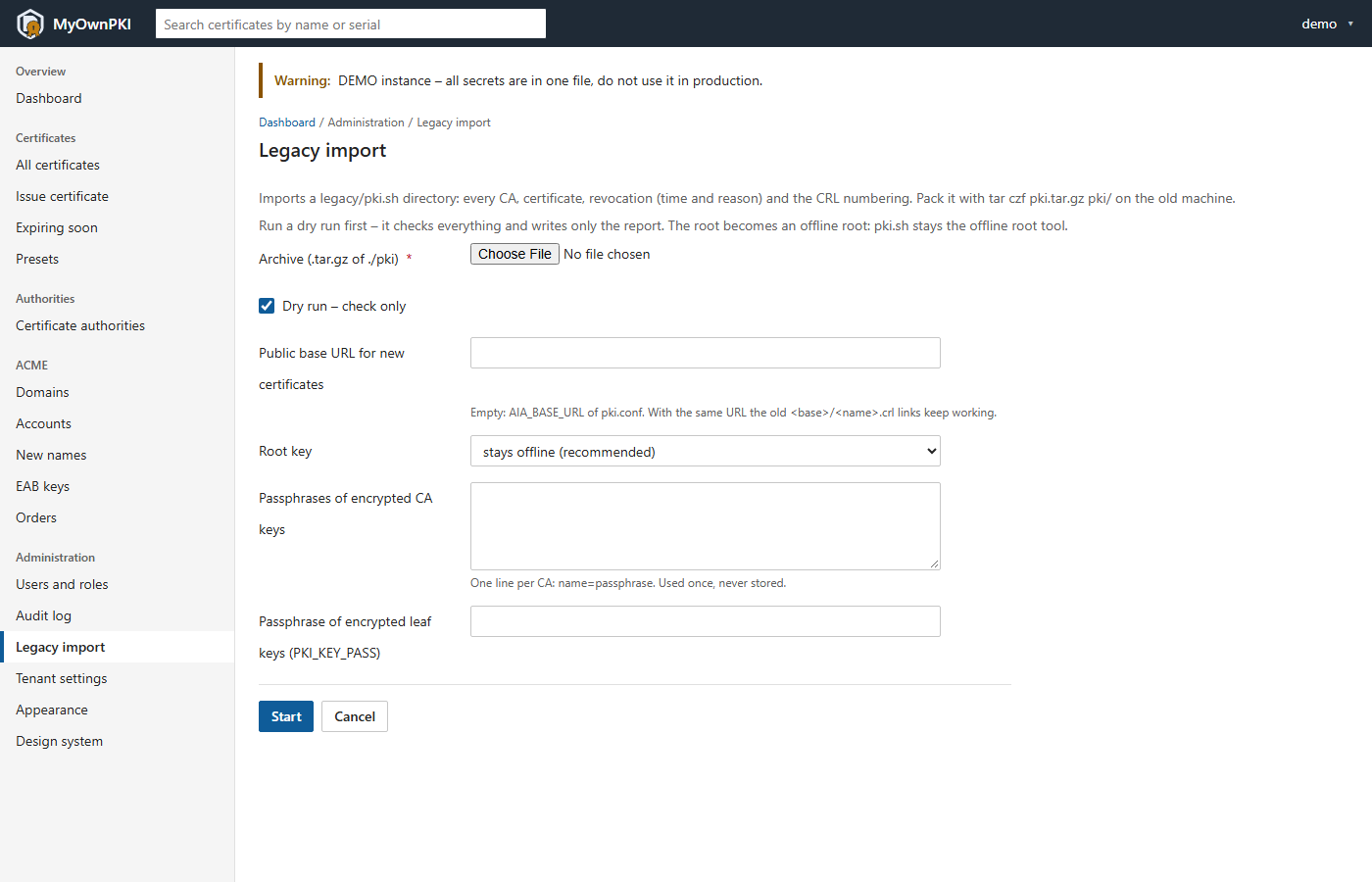
The UI offers the same under Administration → Legacy import: pack the directory with
tar czf pki.tar.gz pki/, upload it (the dry-run box is ticked by default), enter the passphrases
(used once, never stored) and choose the root key mode.
3. After the import
-
The root’s CRL. The root stays in
pki.sh. Sign its CRL there as before and upload it on the root’s page (Upload the root’s CRL):./pki.sh crl --ca rootThe form takes the PEM text: paste the contents of
publish/root.crl.pem(publish/root.crlis the DER copy). Nobody renews this CRL for you; see Offline root. - The old addresses. Point the web server that served the old CRL addresses at the public listener,
so
<base>/<name>.crland<base>/<name>.crtanswer from MyOwnPKI. - Keep the
pki.shdirectory as it is. It is the offline root and the evidence of the old PKI.
Check it worked
- The command prints “Imported.” and the counts equal the dry run.
-
ca listshows your CAs, the root as offline:runuser -u myownpki -- /usr/local/bin/myownpki ca list --config /etc/myownpki/config.yaml -
An old CRL address answers from the new server, and its number is higher than before:
curl -sS http://pki.homelab.lan/server-ca.crl | openssl crl -inform DER -noout -crlnumber -nextupdate - An old certificate still verifies against your root, and the audit log has
import.legacy.
When it fails
- “Not imported – fix the problems above”: nothing was written. Fix the files or options the report names and run the dry run again.
- “the key of CA … is encrypted – set PKI_CA_PASS_…”: the variable name is the CA name in upper case; a name with dashes may need underscores.
- “… expired on …” or “its CRL expired”: the warning says what to do; for a CRL, run
pki.sh crland upload the result. - Clients cannot check old certificates: the old address does not reach this server.
- More: Troubleshooting and operations guide §5.
Next steps
- Hand clients the root again and compare its fingerprint: Make clients trust your root.
- Set up the daily backup check: Backup and restore.
- Plan the root’s life: Offline root.